

At Tech Learning, we specialize in Moodle Single Sign On (SSO) integration—a secure and efficient way to streamline user logins across your Moodle platform. With Single Sign-On (SSO), users can access Moodle and other systems using a single set of credentials, improving both security and user experience. Whether you’re a school, university, or enterprise, SSO makes Moodle access seamless.
💡 What is Single Sign-On (SSO)?
Single Sign-On (SSO) is a secure authentication process that enables users to access multiple systems with one set of login credentials. For example, with SSO configured, a user can log into Moodle using their existing Microsoft or Google account—without needing to remember another username and password.
SSO improves user experience and enhances security by reducing password fatigue and minimizing attack surfaces.
🔧 Authentication Methods in Moodle
Moodle supports a wide range of authentication methods, including:
-
Manual login (default)
-
Email-based self-registration
-
OAuth2 (Google, Facebook, etc.)
-
LDAP
-
SAML2
-
OpenID Connect
You can manage these methods by navigating to:Site administration > Plugins > Authentication > Manage authentication
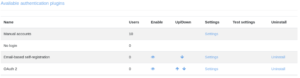
From this page, admins can enable, disable, and prioritize different login methods, as well as view how many users are assigned to each.
🔐 SAML2 Authentication for Moodle
SAML2 is one of the most widely used SSO protocols in the Moodle community. It enables secure communication between your Moodle site and your Identity Provider (IdP) without needing extra installations or services.
✅ Why Choose SAML2?
-
No external software required
-
Full configuration is done within Moodle
-
Works with major IdPs (e.g., ADFS, Okta, Azure AD)
Access SAML2 settings in Moodle:Site administration > Plugins > Authentication > SAML2

🔗 Learn more about the SAML2 plugin on Moodle.org
🔄 OpenID Connect Authentication
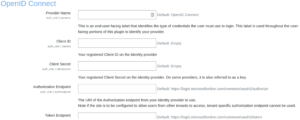
OpenID Connect is another powerful SSO option, particularly for organizations using Microsoft 365 and Azure Active Directory. With this plugin, users can sign into Moodle using their Microsoft credentials.
✅ Benefits of OpenID Connect:
-
Seamless login with Microsoft 365 accounts
-
Auto-creation of Moodle accounts for new users
-
Easy switching from existing Moodle accounts
Access OpenID Connect settings in Moodle:Site administration > Plugins > Authentication > OpenID Connect
🔗 More on Moodle’s OAuth2 authentication
🔗 Google OAuth2 Plugin
👤 Assigning Authentication Methods to Users
When creating or editing a user account in Moodle, you can select their authentication method from a dropdown menu. For example, if OpenID Connect is enabled, users will see a dedicated login button on the Moodle login page.
🚀 Why Use Tech Learning for SSO Integration?
We don’t just install plugins—we ensure a full, secure, and tailored integration of SSO into your Moodle environment. Our team handles:
-
Plugin setup and configuration
-
Integration with your existing identity provider
-
Custom login workflows
-
Testing and training
Let us help you simplify user access and enhance your Moodle security today.

Get in touch with us to learn how SSO can streamline your Moodle access and reduce support overhead.
📞 [Contact Us]
📧 support@techlearning.com.au
🌐 www.techlearning.com.au/contact