

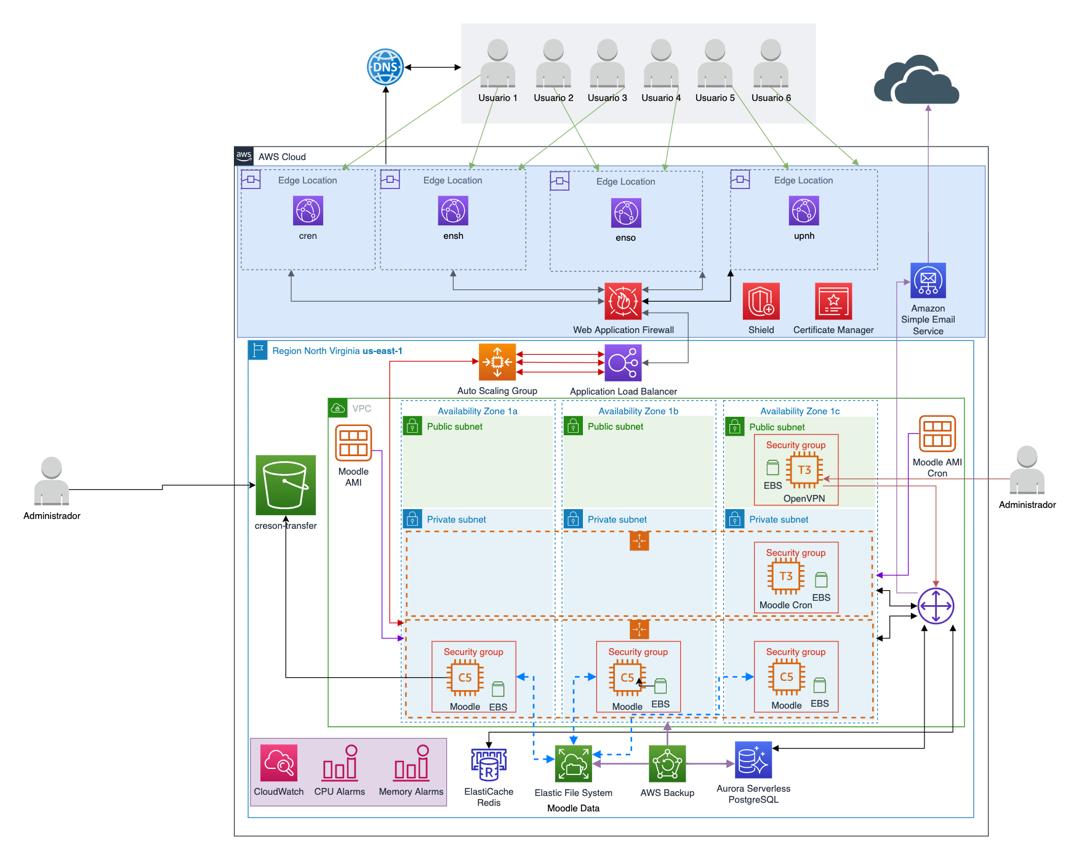
Moodle Page Load Issues: Causes and Fixes
Moodle page load issues can significantly impact learner experience, especially when users face slow course loading, delayed quizzes, or unresponsive dashboards. This article explains why Moodle performance problems happen and how to fix them effectively.
Poor performance is often caused by hosting limitations, database bottlenecks, or missing caching layers.
Useful references:
Moodle Official Site (https://moodle.org) | Redis Caching (https://redis.io) | Google PageSpeed Insights (https://pagespeed.web.dev/)
A slow Moodle site can also increase support tickets and reduce confidence in your training programs. This article explains the main causes of Moodle page load issues and how to fix them effectively.
Why Moodle Page Load Issues Matter

Slow performance is not just a technical problem — it directly impacts learning outcomes.
- Lower learner engagement
- Reduced course completion rates
- Higher dropout rates
- Poor user satisfaction
- Increased IT support requests
If Moodle pages are slow, learners simply disengage.
Common Causes of Moodle Page Load Issues
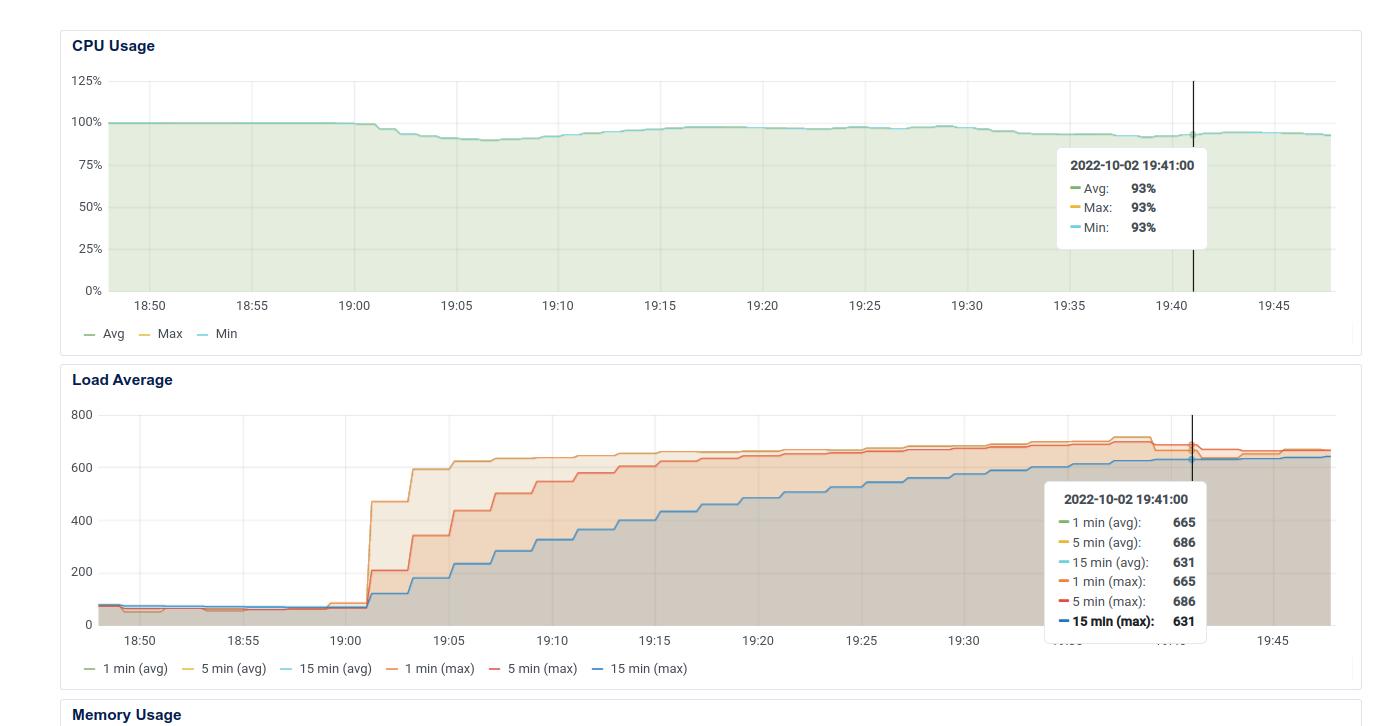
1. Poor Moodle Hosting Performance
Many Moodle performance problems start with weak hosting infrastructure.
- High CPU usage
- Low RAM availability
- Slow disk I/O
- Shared hosting limitations
2. Database Bottlenecks in Moodle
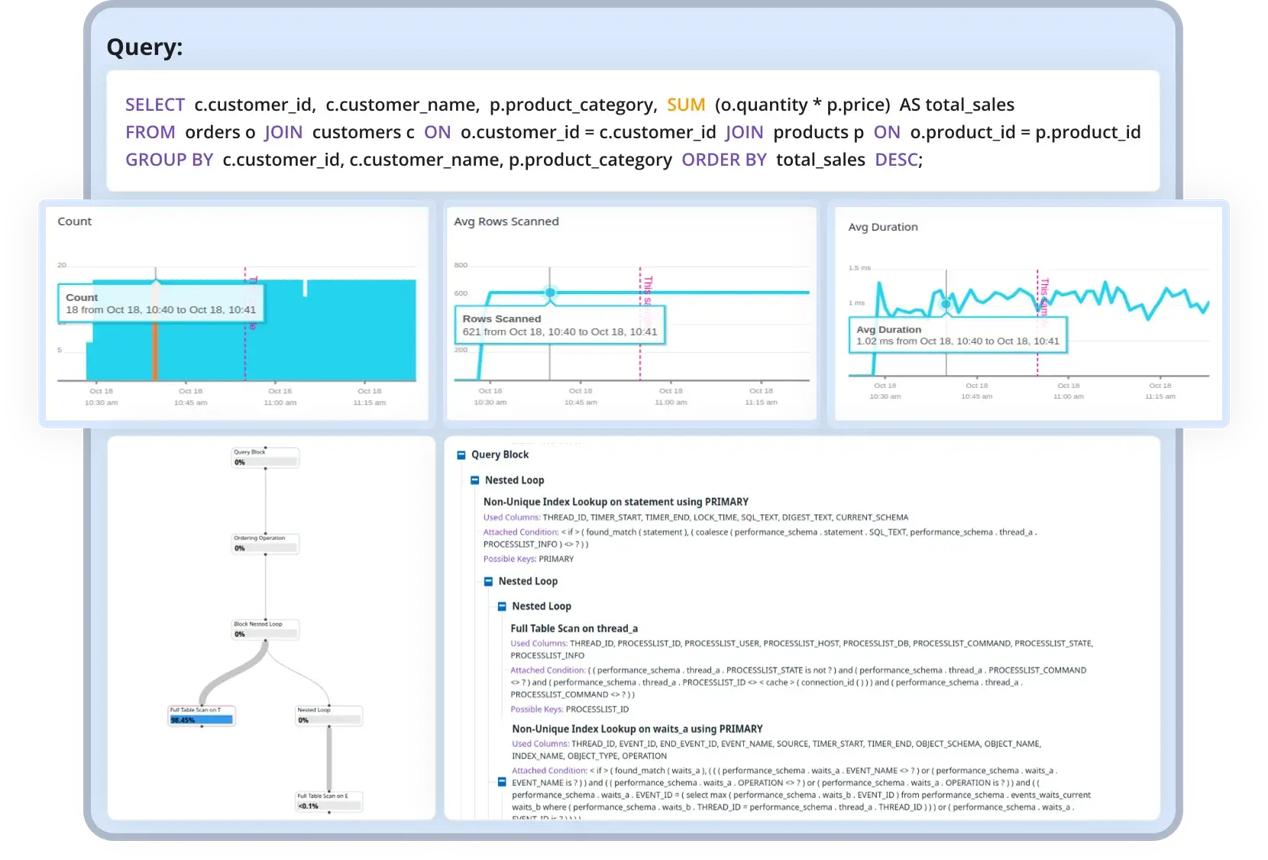
The Moodle database handles everything — users, courses, grades, and logs.
- Missing indexes
- Large log tables
- Slow SQL queries
- Poor optimisation
3. Missing or Incorrect Caching
Without caching, Moodle repeatedly rebuilds pages and increases server load.
- Redis caching improves performance
- OPcache speeds up PHP execution
- Browser caching reduces load time
Moodle Page Load Issues from Plugins
Poorly built plugins can significantly slow Moodle down.
- Excess database queries
- Heavy background tasks
- Inefficient rendering
How to Fix Moodle Page Load Issues
Improve Hosting Infrastructure
- Dedicated servers
- Cloud hosting
- Scalable architecture
Enable Caching (Very Important)
- Redis (sessions + cache)
- OPcache (PHP optimisation)
- Browser caching
Optimise Database
- Clean logs regularly
- Add missing indexes
- Optimise slow queries
Best Practices for Moodle Performance
- Monitor performance regularly
- Remove unused plugins
- Optimise course content
- Archive old courses
- Track server health
When to Get Moodle Performance Help
If issues persist, a professional Moodle performance audit can help identify hidden bottlenecks.
- Server tuning
- Database optimisation
- Caching configuration
- Plugin analysis
- Infrastructure review
Final Thoughts
Moodle page load issues can seriously affect learner experience and organisational training outcomes.
However, with proper hosting, caching, and database optimisation, most performance issues can be resolved effectively.
Need Help Fixing Moodle Performance?
If your Moodle site is slow or struggling under load, professional optimisation can significantly improve performance.
- Moodle hosting optimisation
- Performance audits
- Redis configuration
- Database tuning
- Scalable infrastructure setup
Ready to boost your Moodle hosting performance? Book a free consultation today to host your Moodle LMS with expert support, high uptime, and secure, scalable infrastructure.
📞 [Contact Us]
📧 support@techlearning.com.au
🌐 www.techlearning.com.au/contact